Smart Spaces
Smart Spaces allow you to organize and manage different areas of your building, providing a tailored interface for monitoring and control.
Overview
A Smart Space represents a physical or logical area within your installation—such as an office, a meeting room, or a residential unit. Each Smart Space can have its own set of controls, visualizations, and automated flows.
Configuring Access Rights
By selecting a Smart Space from the right-hand menu, you can configure specific access rights for that area. This allows you to manage who can access the space and how.
Supported access methods include:
- PIN Users: Define numeric codes for keypad entry.
- Mobile App Users: Grant access via the Fentrica mobile application.
- License Plates: Register vehicle license plates for automated gate access.
- Access Cards: Manage NFC/RFID cards for physical card readers.
Cloud Synchronization
If your device is connected to the Fentrica Cloud Platform, all access rights are automatically synchronized.
- Cloud Indicator: A "Cloud" icon will appear next to synchronized users.
- Read-Only: Synced users cannot be modified or removed locally on the device; all management must be done through the cloud platform.
Integration with Bench
The logic behind each Smart Space is powered by Fentrica's Bench. You can wire together nodes to verify identity and trigger physical actions.
Access Control Examples
Access users configured in a Smart Space are utilized by specific Bench nodes to verify credentials:
- Door Access: Use an OSDP card reader node to receive a PIN code or card read. Connect it to a verification node to check against the Smart Space's user list. If verified, trigger a Relay node to unlock the door.
- Parking Access: Use an HTTP IN node to listen for requests from a License Plate Recognition (LPR) camera. Pass the data to a License Plate Verification node to check if the plate belongs to an authorized user. Once succeeded, use a Digital Out node to open the barrier gate.
For more details on building the backend for these spaces, see the Configuration Bench section.
Visualization and Mobile App
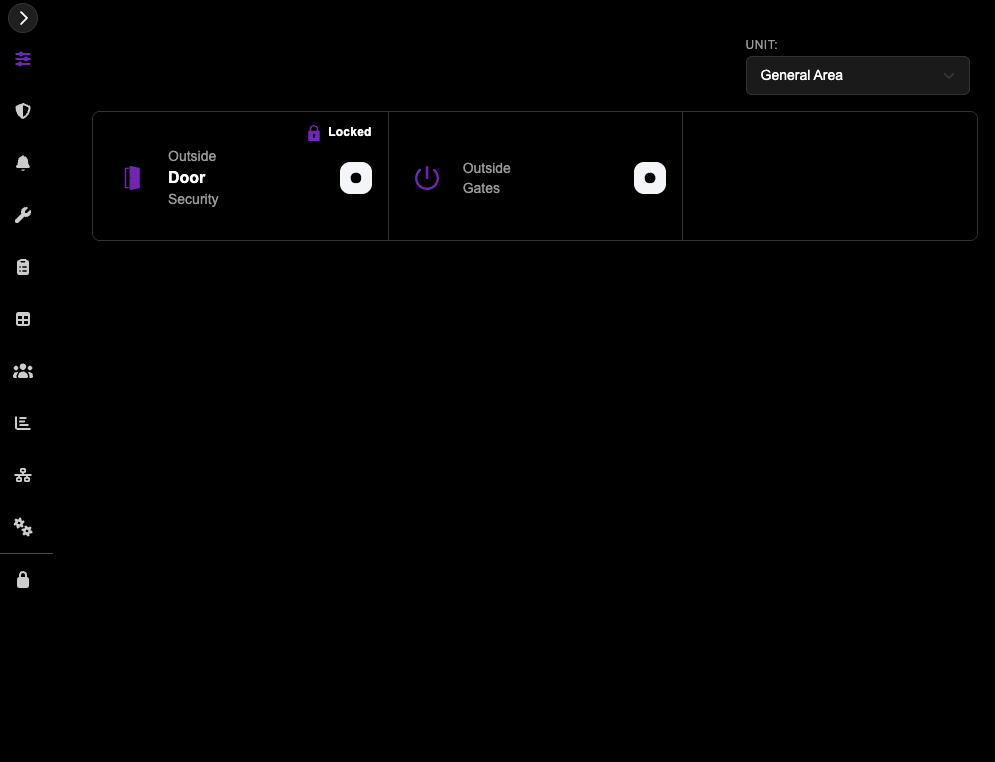
To understand how your Smart Space is configured from a user's perspective, use the Dashboard. This view allows you to see exactly what Mobile App users will see when they interact with the Smart Space and verify how the nodes are functioning.
Use the top dropdown in the Dashboard to select the specific Smart Space you wish to view.
Mobile App Support
Currently, Mobile App users are supported only for Fentrica Platform customers and their tenants.
For more information, please refer to the Mobile App Users section in the Fentrica Platform documentation.