Access
The Access dashboard gives you a combined view of access management across all your managed sites. It tracks access methods, policy health, and security events.
KPIs
The dashboard tracks key indicators covering policy health (expired, expiring soon, unrestricted), access method usage (app, card, PIN, license plate), and security events (authorization failures, unusual patterns). Each KPI card shows the current value with a trend comparison.
Key concepts
Access Policy
An access policy defines who can access your building and when. Each policy has a name, type, activation period (start and end dates), and can be enabled or disabled. Policy types include: tenant, visitor, employee, maintenance, security, contractor, delivery, and emergency.
A policy without an end date grants unrestricted access until it is manually disabled.
Access Group
An access group defines where a policy grants access — which spaces and areas in the building. You link one or more access policies to a group. The combination of policy + group determines the complete access: who can enter, how, and where.
App User
A person who accesses the building through the Fentrica mobile app. They authenticate via their email account and receive cloud-based access. App users can be assigned a role within their policy — user (standard access) or master (can manage access resources within the policy).
PIN User
A person who accesses the building using a numeric PIN code. PINs can be set manually or delivered automatically via SMS or email on a schedule. A single person can have both app access and a PIN.
Access Card
A physical card used for door entry. Each card has an identifier and can optionally require a PIN for two-factor authentication. Cards are linked to individuals and can be associated with a company.
License Plate
A vehicle registration number used for parking gates and vehicle entry systems. Each plate is linked to a person or company.
Dashboard tabs
- App & PIN Users — All mobile app users and PIN code users across your sites
- Access Cards — All physical access cards
- License Plates — All registered vehicle license plates
- Access Policies — All policies with activation dates, types, and status
- Access Groups — All access groups linking policies to spaces
- Activity Log — Security events, authorization events, and access logs
Each tab supports filtering by site, status, and other relevant attributes.
Granting new access
New Access
Issue tenant access for app, cards, PINs, or license plates.
From the Access dashboard, tap New Access to start issuing access. You can create app users, PIN users, access cards, or license plates and assign them to the appropriate policy and group.
Managing access group users
When you open a user profile within an access group, you can view and manage their access details:
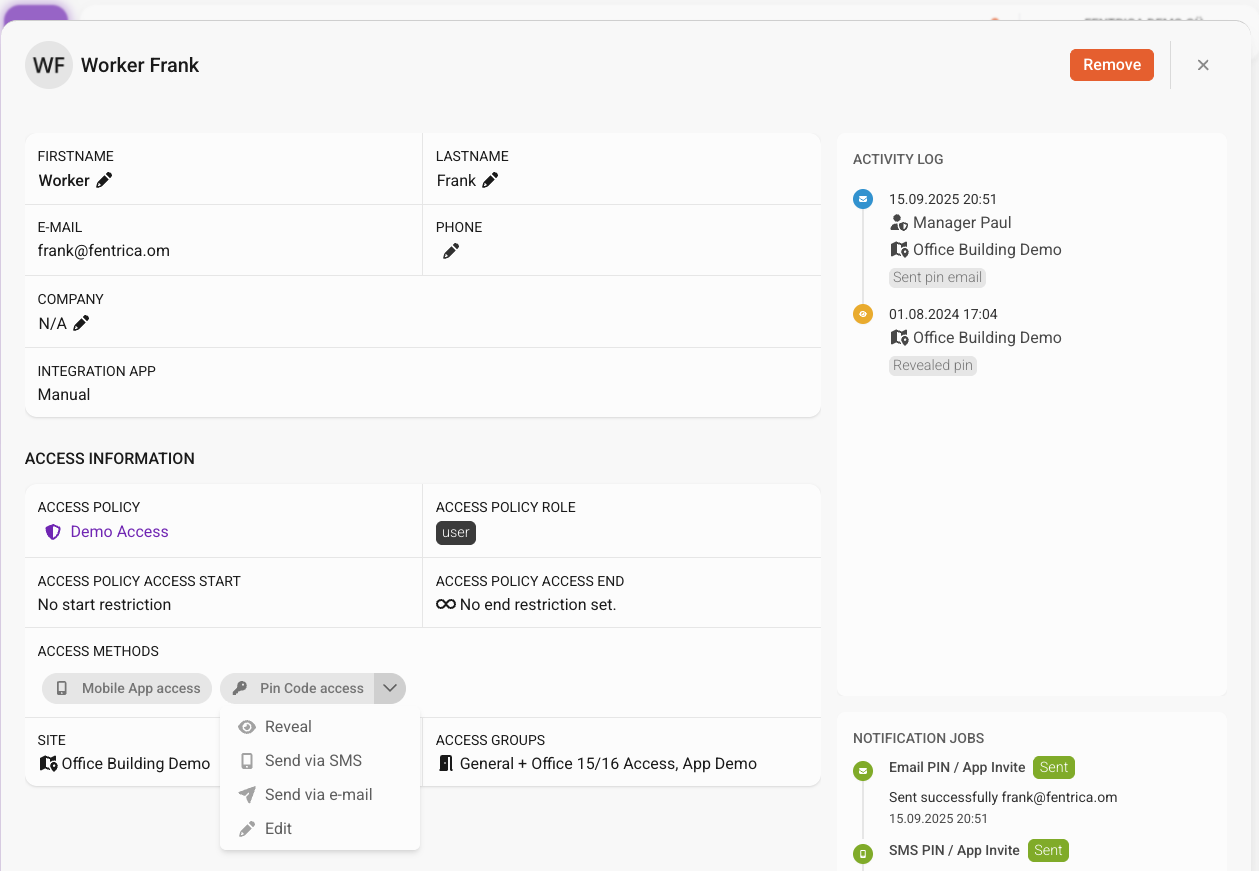
- Reveal PIN code — View the user's current PIN code
- Edit PIN code — Change the PIN to a new value
- Access log — See a history of the user's door access events
- SMS / Email jobs — Review delivery jobs for PIN codes, including whether each message was sent successfully or failed
Sending PIN codes
You can send a user their PIN code at any time by opening their profile within an access group and triggering delivery:
- Email — Sends the PIN code to the user's email address
- SMS — Sends the PIN code to the user's phone number via text message
App invitations
When you add a new app user, Fentrica sends them an invitation email with instructions to download the app and sign in. Once they accept the invitation and create their account, they automatically receive access based on the policy they were assigned to.
Automated access via integrations
If a user, access policy, access card, license plate, or other access resource displays a blue App Integration badge, it was created automatically through an external integration or automation — not manually by a manager.
These resources are managed by the integration and may be updated or removed automatically. See the Expert Guide for how to set up integrations and automations.