Maintenance
The Maintenance dashboard gives you a combined view of maintenance operations across all your managed sites. It tracks incoming requests, active work orders, service provider assignments, deadlines, and tenant satisfaction.
KPIs
The dashboard tracks key indicators covering request volume, work order status and deadlines, completion and resolution times, overdue rates, and tenant satisfaction ratings. Each KPI card shows the current value with a trend comparison.
Key concepts
Maintenance Request
A maintenance request (ticket) is a problem report — submitted by a tenant, a staff member, or the system itself. It describes an issue that needs attention.
Each request tracks who reported it, which space is affected, who is assigned to handle it, and a resolution summary when it is closed.
Request lifecycle
Work Order
A work order (task) is an actionable piece of work created to resolve a maintenance request or as a planned maintenance activity. One request can generate multiple work orders.
Each work order has a deadline, an assigned person or team, a checklist of steps, and a type classification (inspection, testing, periodic, conditional, corrective, repair, emergency, or warranty).
Work order lifecycle
Service Provider
A service provider is a third-party contractor assigned to work orders. Service providers have limited platform access — they can view their assigned tasks, update task status and resolution, upload attachments, and complete checklists. They cannot access other site data.
Service providers are associated with a company and can be assigned to specific work orders across your sites.
Tenant Feedback
After a maintenance request is resolved, tenants can rate the outcome on a 1–5 star scale and leave an optional comment. Feedback is tracked per request and aggregated in the dashboard as an average satisfaction score.
Dashboard tabs
- Maintenance Requests — All tickets across your sites, filterable by status, site, and creation date
- Work Orders — All tasks with deadline tracking, filterable by status, site, and deadline
- Tenants Feedback — Satisfaction ratings and comments, filterable by rating, site, and date
AI Write Helper
When responding to maintenance requests, the platform includes an AI-powered write helper that assists you in composing professional responses. The AI analyzes previous communication on the request, how similar issues were resolved in the past, and site documentation including the knowledge base to suggest a response.
You can also write your own draft and the AI will polish it — improving clarity, tone, and completeness based on the same context.
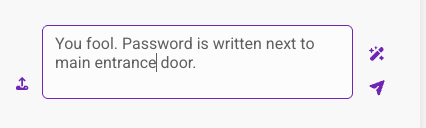
Your draft
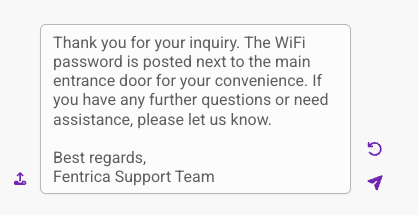
AI polished
Available Quick actions
New Maintenance Request
Capture an incoming maintenance issue for follow-up.
New Maintenance Work Order
Plan a task for on-site teams or service providers.